September 25, 2026
Highlights
Devs.ai now fits in your pocket, shows you where things are, and runs on the newest models.
- A new Devs.ai app for iPhone and Android. Chat with your agents, pick up recent conversations, keep an eye on your routines, edit canvases, start an app in App Builder, and get a notification when a routine or research finishes. Get it on the App Store or Google Play.
- Maps in chat. Ask for places, directions, or what is near you, and the answer comes with a map you can open full screen or hand off to your maps app.
- New models. GPT-6 Sol and GPT-6 Luna, Claude Opus 5.5, Grok 4.7, and new image models from OpenAI and xAI. New companies now start on GPT-6 Luna.
- Preview: talk to Devs.ai, and let it multitask. Voice calls can run several tasks at once, each in its own subchat, on the web and on your phone. They are in early preview: reach out to your account team if you would like to try them.
The full notes below also cover calling in by country, keyboard shortcuts in the composer, and steadier App Builder sessions.
New features
The new Devs.ai app for iPhone and Android
The mobile app has been rebuilt from the ground up. It opens on a calm home screen with your agents and recent conversations, and a single place to ask anything.
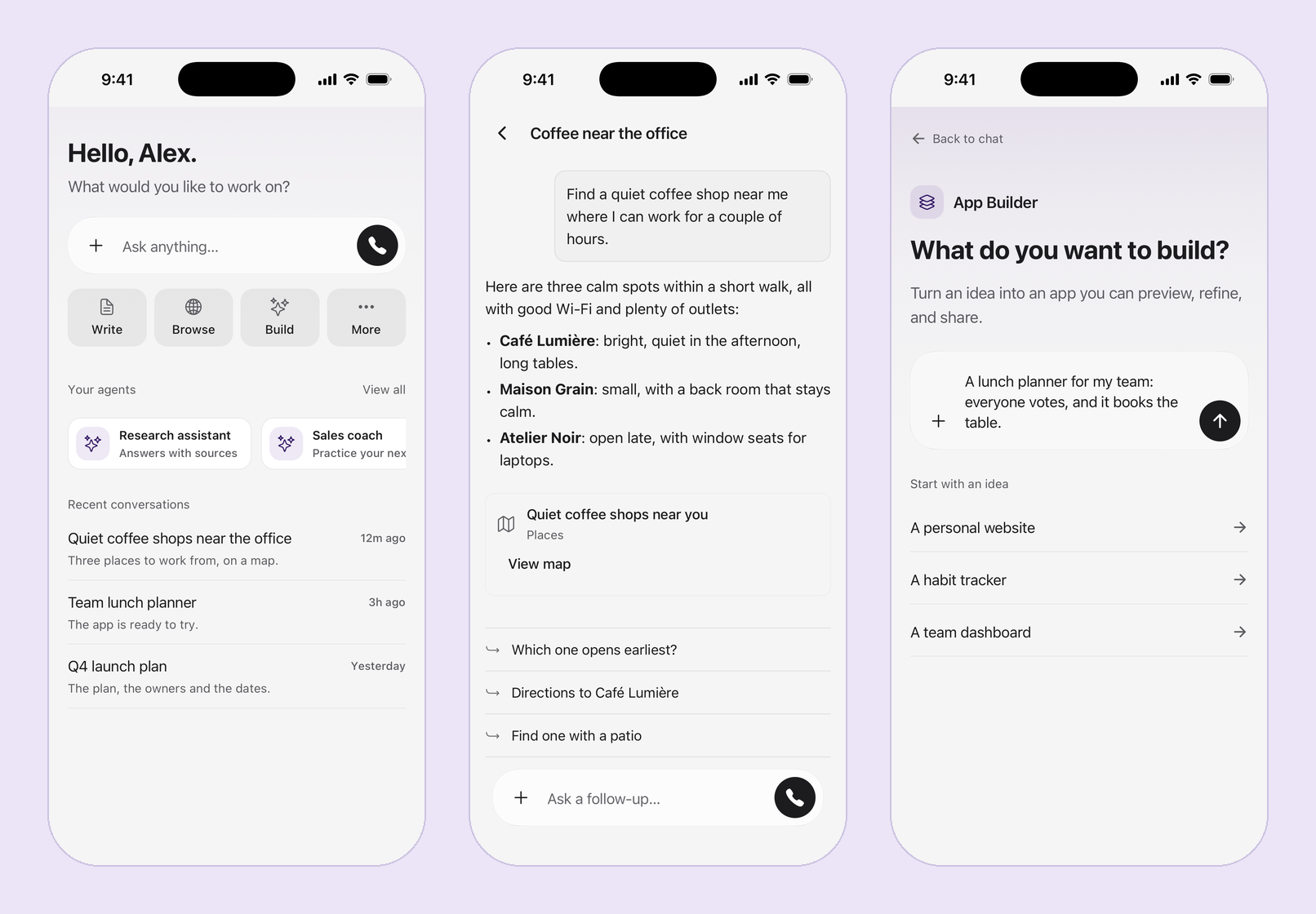
- Chat that keeps up. Answers stream in smoothly as they are written. Scroll up while an answer is arriving and the conversation stays where you left it until you return to the bottom.
- Everything the web shows. Tables, maps, documents, and follow-up suggestions appear in the conversation, and open full screen with a tap.
- Your agent, remembered. The app keeps the agent you chose last, even after you close it.
- Build on the go. Start an app in App Builder from your phone and continue it on the web.
- Notifications that bring you back. Move a call from the web to your phone and it rings. Send a conversation to your phone and it shows up as a notification. Get a notification when a routine finishes or deep research is ready. Choose which ones you get under Notify me about in the app's settings. Notifications say what happened, never the content: routine names, results, and research topics stay in the app. Notifications are rolling out progressively, organization by organization.
Your routines and documents come along too. Check what is scheduled next, run or pause a routine, and open a canvas to read it or make an edit, with headings, lists, tables, and checklists.
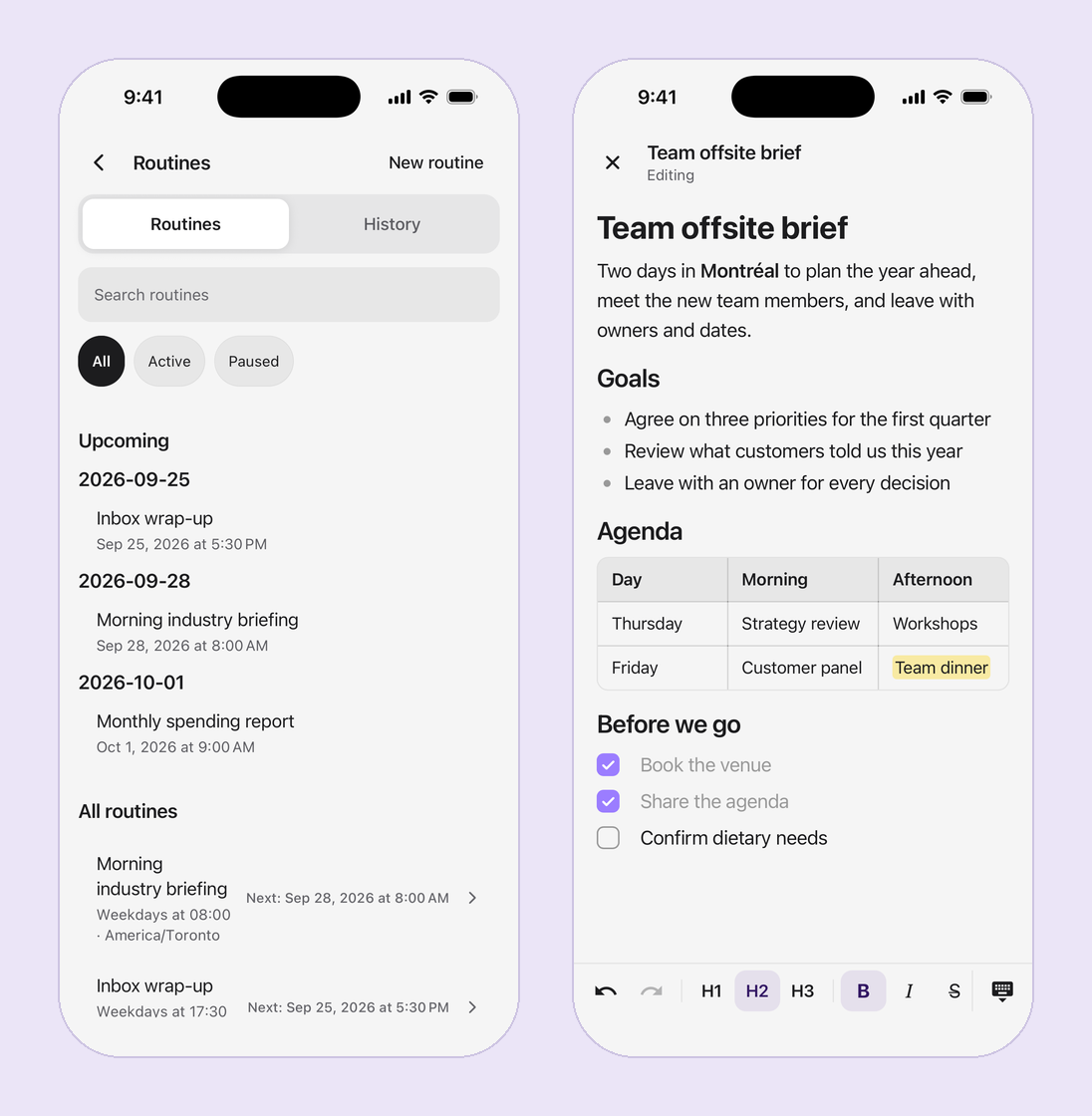
Get the app on the App Store or Google Play, or update it if you already have it.
Maps in chat
Ask about a place, a route, or what is nearby, and Devs.ai answers with a map in the conversation. Open it full screen to look around, or choose Open in Maps to continue in Apple Maps or Google Maps.
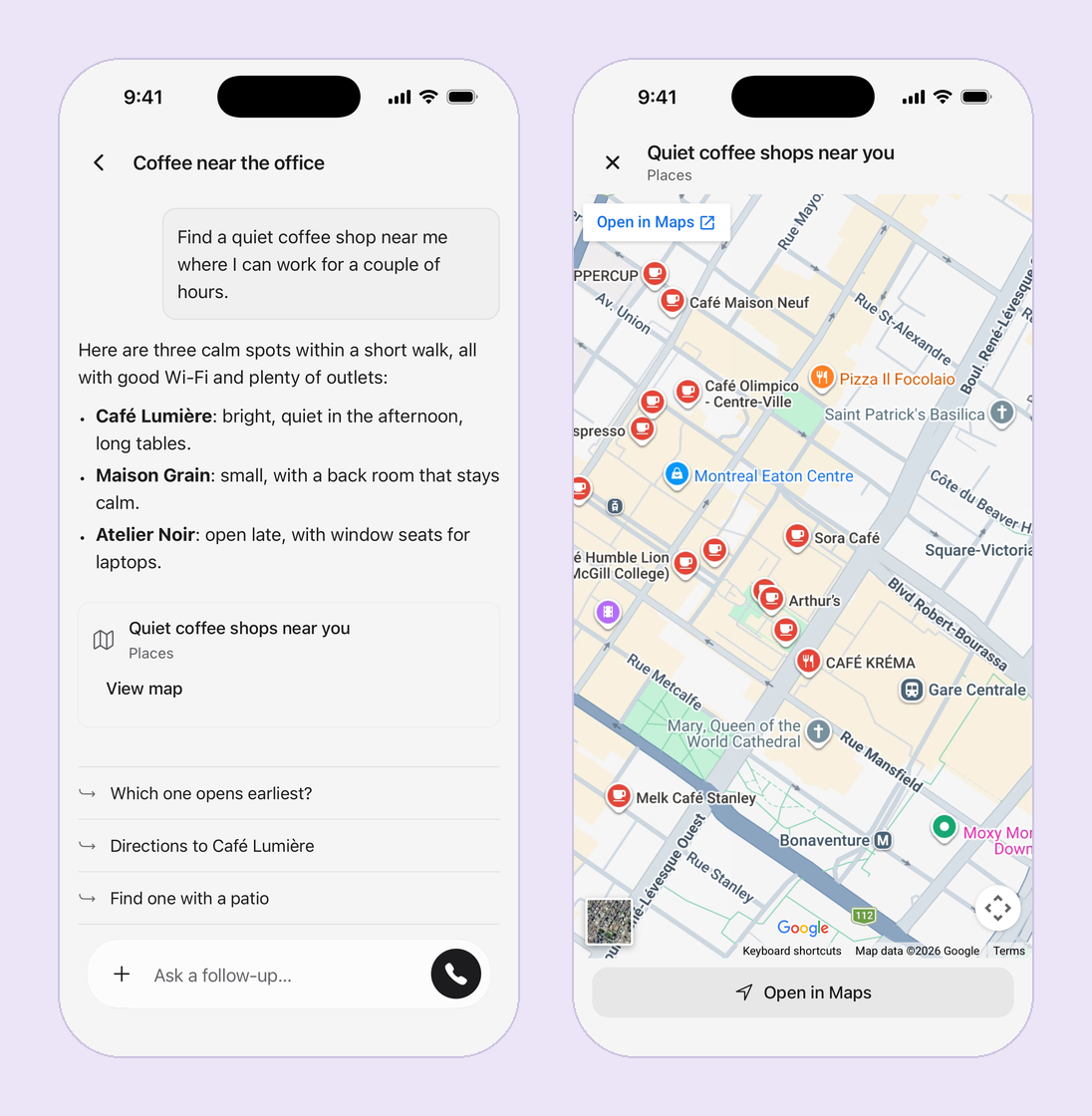
For questions about what is near you, Devs.ai asks for your location first. On the phone, you can turn location sharing on from + in the composer. If you prefer not to share it, name a place instead.
New models
- GPT-6 Sol and GPT-6 Luna. OpenAI's newest models. GPT-6 Sol is a premium model for the hardest work. GPT-6 Luna is a fast, everyday model.
- Claude Opus 5.5. Anthropic's most capable model, with adaptive thinking that spends more effort only when a question needs it.
- Grok 4.7. xAI's latest model.
- GPT Image 2.5 Flare and Sunburst, and Grok Imagine Image 2.0. New image models for creating and editing pictures in chat.
GPT-6 Luna and the new image models are ready to use. GPT-6 Sol, Claude Opus 5.5, and Grok 4.7 are premium models: admins can turn them on in organization model settings.
New companies that have not saved model settings now start on GPT-6 Luna instead of GPT-5.4. Companies that already chose a default model keep that choice.
Gemini 2.5 Flash Image retires on October 2, 2026. Agents that use it will need another image model after that date.
Preview: voice calls that multitask
Talk to Devs.ai the way you would talk to a colleague. Start a call, ask out loud, and hear the answer as it is being worked out.
A call can take on several tasks at once while you keep talking. Ask it to find venues, start an app, and compare flights, and each task runs in its own subchat. Cards in your chat show each task's progress, and a finished task opens to its full result, with a link back to the main conversation. The call stays with you in a compact bar, so you can read along without hanging up.
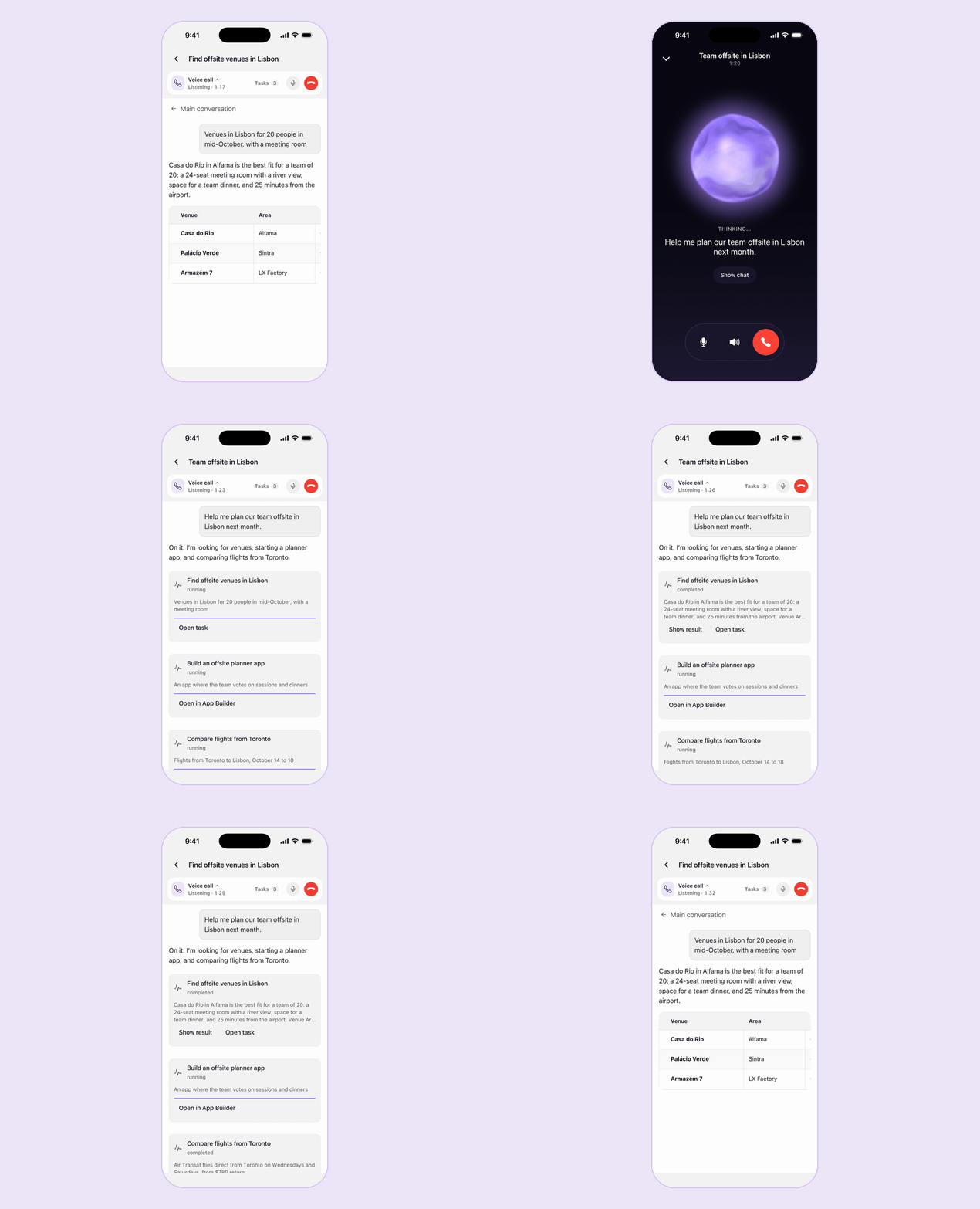
On the web, the call shrinks into a dock in the corner of the chat while the tasks work.
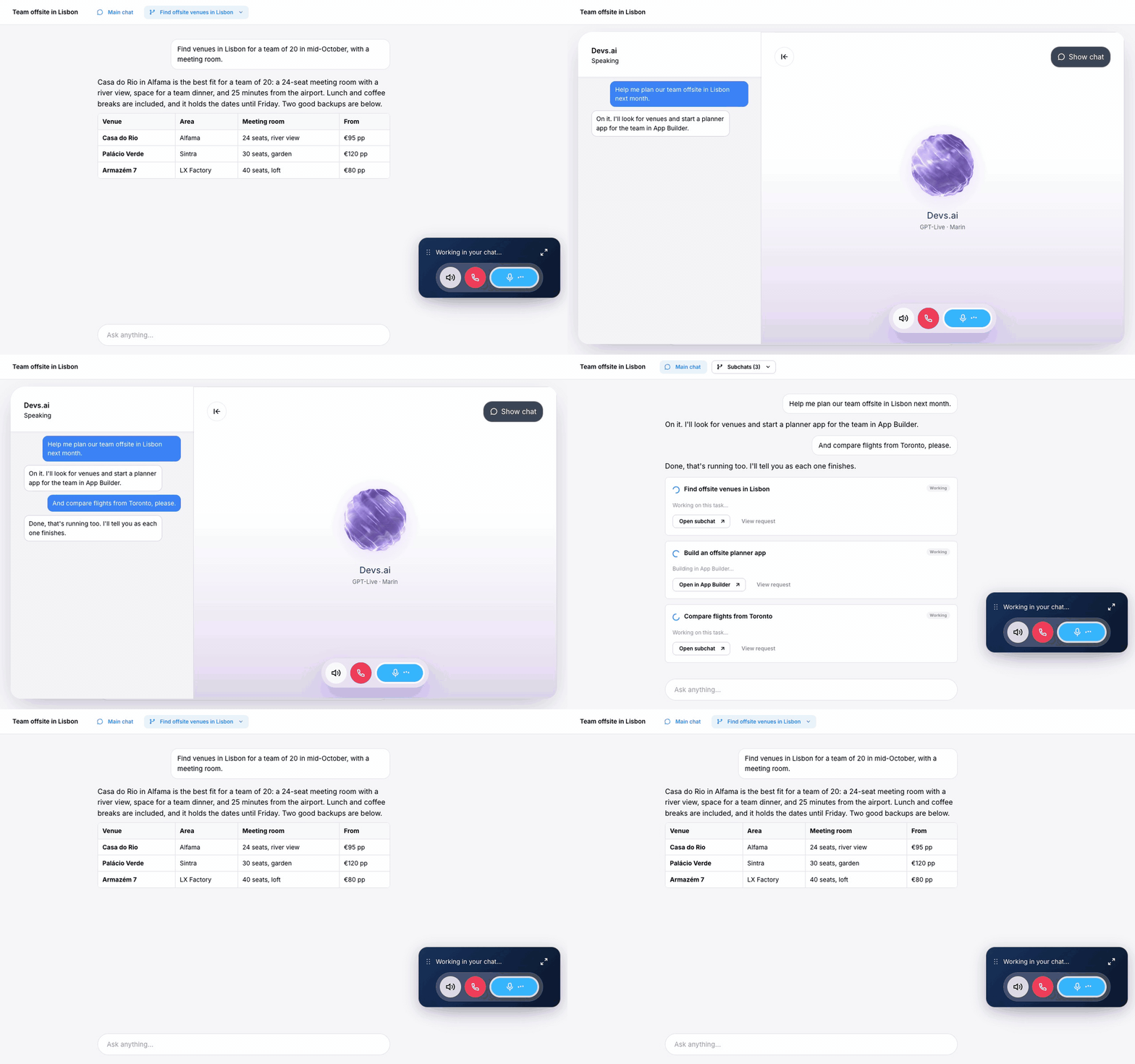
Voice calls are in early preview and are not yet available to every organization. Reach out to your account team if you would like to try them.
Call the number for your country
If you call in to reach your agents, the Phone page now shows the number for the country you are calling from.
Choose Country under Numbers to dial. Canada and the United States are available, each with its own number. Copy that number, then call it from any phone to start a chat session. When only one country is configured, that number is shown directly.
Phone appears in account settings where calling is available for your account.
Improvements
- Keyboard shortcuts in the composer. In chat and App Builder, press Cmd/Ctrl + / to open the model picker, and Cmd/Ctrl + Shift + / to change the reasoning effort. Pasting text that comes with files no longer drops the text.
- Announcements that stay out of the way. Product announcements now appear as a small notification in the bottom-right corner instead of interrupting your work.
- Agents know today's date. Answers that depend on the date, like deadlines and schedules, start from the right day.
- See a connector's tools before you enable it. Managed connectors list the tools they offer before you turn them on.
- Connector sessions carry across messages. Custom connectors keep their session from one message to the next instead of starting over.
- Steadier App Builder sessions. A freshly proposed plan is accepted after 10 seconds unless you step in, so the build keeps moving, and long builds continue past the step limit instead of stopping partway.
- Routines pause when their agent is gone. If an agent is deleted, its routines pause instead of failing on every run.
- Sign in with Google, then choose your organization. People who belong to more than one organization pick where to go after signing in.
- Phone approval texts send more reliably. The link we text you to approve a call uses a message template that carriers can deliver.
- Inbound calls connect when the dialed number has no leading plus.
- For developers. The Responses API is also available at
/api/v1/responsesfor OpenAI-compatible clients, API functions can be up to 1 MB, and Slack and Microsoft Teams API keys can include file scopes.
Bug fixes
Custom connectors keep their previous authentication when you leave Managed connector and return to your own server, so saved credentials are not cleared. Chats that used web search also continue more reliably when the conversation moves to Claude.